Troubleshoot Camera Issues
Make sure the camera slider is not blocking the camera
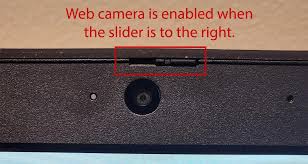
If you see a red circle on the camera it means the camera is blocked, slide the slider to the right
Related Articles
Troubleshoot Microphone Issues
About: If you are getting an error in Google Meet or other video conference apps - or if no one can hear you when you talk on video calls, try the steps below Example of Google Meet error: Pro Tip: On most laptop models you can press the F4 key (or ...Troubleshoot Audio issues
If you are having microphone issues, see Troubleshoot Microphone Issues. Click the volume icon in the system tray near the clock then click Select a sound output Make sure your audio output device is one of the below options Sometimes your audio ...Troubleshoot Java App Issues
About: If you are getting errors in apps that use Java like Opera, Marsha, BPA connector, etc - try the steps below. Click the Start button in the lower left corner, then open Control Panel Make sure View by is set to Category, then click ...How to fix Skystem PDF Export Issues
About: When exporting reports from Skystem, the resulting .zip files may fail to open or appear corrupted. This guide explains how to fix the file extension so the PDFs can be extracted successfully. Note: The Skystem report must already be ...Brains 2024 Business Plan Access Issues
1. Log out of BRAINS. 2. Clear your cache. See full steps here: Clear your browser cache in Chrome 3. Log back in and navigate to the page. 4. Click the pencil. 5. Wait about 45 seconds and try the pencil again. 6. Refresh the page if it doesn't ...