Troubleshoot Java App Issues
About: If you are getting errors in apps that use Java like Opera, Marsha, BPA connector, etc - try the steps below.
Click the Start button in the lower left corner, then open Control Panel | |
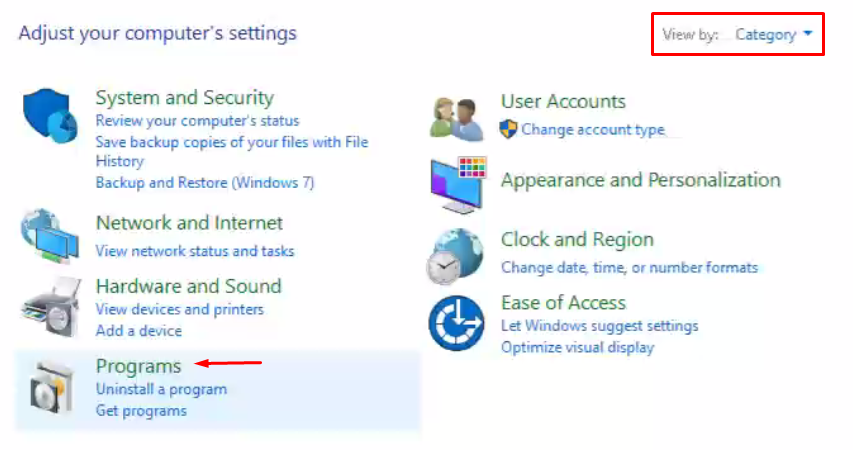
Make sure View by is set to Category, then click Programs | |
Click JavaIf you do not see Java as an option to click, please create a ticket with us so we can install Java for you. | |
Delete Java Temp files
 You may also need to restore security prompts: Click the Security Tab > click Restore Security Prompts Try accessing the website again and see if your issue is resolved.  |


Related Articles
Troubleshoot Audio issues
If you are having microphone issues, see Troubleshoot Microphone Issues. Click the volume icon in the system tray near the clock then click Select a sound output Make sure your audio output device is one of the below options Sometimes your audio ...Troubleshoot Camera Issues
Make sure the camera slider is not blocking the camera If you see a red circle on the camera it means the camera is blocked, slide the slider to the rightTroubleshoot Microphone Issues
About: If you are getting an error in Google Meet or other video conference apps - or if no one can hear you when you talk on video calls, try the steps below Example of Google Meet error: Pro Tip: On most laptop models you can press the F4 key (or ...Add a site to the Java Security Exception List
About: Websites that use Java will need to be added to this list in order for the Java apps to be allowed to run. If you get an error saying "Java app blocked" or something similar, try the steps below and try again and see if your issue is resolved. ...Install the Gmail app on your phone
About: See below to learn how to install the Gmail app on your phone. The Gmail app provides you with the ability to view and respond to email, chats and even join Google Meet video calls. Install the Gmail app on your phone, then sign in If you have ...